Search


Ricoh-imaging.co.jp
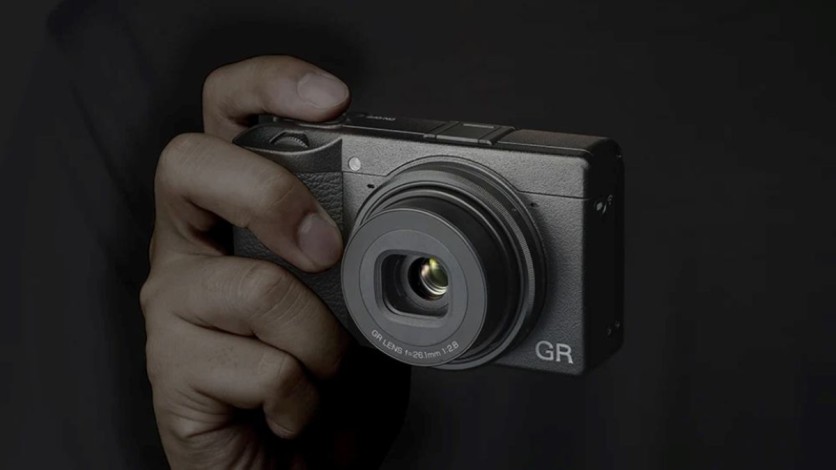
Ricoh Imaging published a notice dated Nov. 20 warning that a DB-120 battery left in a Ricoh GR IV for more than a month at a low charge can over-discharge, after which it may not recharge. Owners who shelve a GR IV, GR IV HDF or GR IV Monochrome between trips should act now, because Ricoh's support page says a computer USB port cannot recover a battery in that state.
The notice, which covers getting long use from the DB-120 lithium-ion battery, gives three storage instructions: do not leave a low-charge battery in the camera for more than a month; if the camera will go unused for more than a month, remove the battery from the camera or charger and keep it away from high temperature and humidity; and for long-term storage, charge it for about 30 minutes every six months to a year. The page describes no defect or recall and lists no contact details.
The notice is addressed to the RICOH GR IV series and names no individual models. Ricoh lists the DB-120, rated at about 250 shots per charge, for the GR IV feature page, the GR IV HDF FAQ and the GR IV Monochrome specifications, so the guidance spans the family. Polish site Optyczne.pl also covered the notice and summarized the interval as every six months; Ricoh's own page gives six months to a year, which is the range to follow.
Why Does a Switched-Off GR IV Still Drain Its Battery?
Ricoh's notice does not explain the mechanism, and the company has published no standby-current figure, so how fast any given DB-120 runs down is unknown. Three drains are documented, one by Ricoh and two in general battery references.
First, Ricoh's GR IV FAQ says that with wireless communication turned on, the camera keeps emitting a Bluetooth signal after it is switched off, which may drain the battery. Second, lithium-ion cells lose charge on their own: Wikipedia's lithium-ion battery entry gives 1.5% to 2% per month, and Wikipedia's self-discharge entry lists 2% to 3% and about 4%, with losses faster at higher temperatures. Third, protection electronics draw current of their own. Wikipedia notes that the protection circuitry's small draw can pull a stored battery below its shutoff voltage, and CALCE researchers list cell self-discharge, battery management system power requirements and parasitic loads as reasons stored pack voltage falls.
Protection Circuit Lockout Explains Why an Over-Discharged DB-120 Refuses Charge
Lithium-ion packs contain a protection circuit that disconnects the battery when its voltage falls too low. Battery University's low-voltage cutoff page puts that cutoff between 2.2 and 2.9 volts per cell depending on the manufacturer, and says a pack stored discharged can slide into this protective sleep state as self-discharge drains it. Ricoh has not published the DB-120's cutoff. Adorama's DB-120 listing gives the pack a 3.85-volt nominal rating and a 4.4-volt charging voltage.
The lockout is a safety feature, which is the largest implication the notice leaves unstated. Wikipedia's lithium-ion battery entry says discharging below about 2 volts can dissolve the copper anode current collector, which it says can later cause a severe internal short circuit on recharge. University of Maryland's CALCE and the Naval Surface Warfare Center Carderock Division examined that copper dissolution in overdischarged cells in a February 2020 journal paper, and the abstract says overdischarge can bring safety and performance problems. A battery that refuses a charge may therefore be protecting itself and the camera rather than simply failing. That is general battery science, not a statement about the DB-120, whose circuit Ricoh has not described.
Battery University adds three cautions. Some chargers offer a wake-up "boost" that restarts a locked-out cell, a pack that does not recover within about a minute should be discarded, and a pack that has sat below 1.5 volts per cell for a week or longer should not be boosted because copper shunts may have formed inside. That is consistent with Ricoh pointing owners to specific chargers rather than improvised methods, though Ricoh has not said why.
Read more: Ricoh GR III and GR IIIx Camera Firmware Update Adds Permanent Anniversary Screen, but Download Window Closes in 51 Days
BJ-12 Charger or USB PD Adapter Is Ricoh's Route Back, Not Computer USB
Ricoh's FAQ says a computer's USB-C port charges the DB-120 through the included I-USB198 cable, even with the battery in the camera. If the battery has been left in the camera long enough to over-discharge, the FAQ says charging with a device other than a computer is required. Two options are listed: the optional BJ-12 battery charger, with the battery removed from the camera, or a commercially available USB Power Delivery AC adapter connected to the camera with the battery inside. The FAQ does not say whether every over-discharged battery can be revived.
A spare DB-120 costs €49.99 at Ricoh's European store (approximately $55 USD). U.S. retailer Adorama lists the battery at $56.95 and the BJ-12 charger at $56.95. The GR III's DB-110 does not fit the GR IV, according to Ricoh's GR IV HDF FAQ.
Pulling the battery has a side effect. Ricoh's notice says removing it for two days erases the camera's date and time, and the GR WORLD smartphone app can sync them at the next use. The FAQ adds that settings are held for about two days only if a fully charged battery was installed for more than two hours before removal.
GR IV Firmware 1.04 Cut Wireless Drain at Low Battery, but Storage Stays Manual
This is Ricoh's second battery-related customer notice for the GR IV in under a year. On Nov. 28, 2025, Ricoh released firmware 1.04, which turns wireless communication off automatically when the battery level becomes low and revises charging control to reduce battery deterioration, with priority on safety and stability. Digital Camera Watch reported that the wireless shutoff triggers when the battery indicator disappears. The two notices address different things: the 2025 notice was a firmware fix, the new one is storage guidance, and the 2026 notice does not mention firmware 1.04.
Remove Battery, Keep It Cool and Dry, Top Up 30 Minutes Every Six Months to a Year
Ricoh has given similar advice before. Ricoh's FAQ for the older CX5 compact, which uses the DB-100 battery, already advises charging a stored battery about 30 minutes once a year. What GR IV owners should do now:
- Check any camera that has been sitting. If it still powers on, a computer USB-C port charges the battery normally, per Ricoh's FAQ; if the battery will not charge, Ricoh points to the BJ-12 or a USB PD adapter.
- Pull the battery before a long break. Ricoh's threshold is one month.
- Keep it cool and dry, and set a reminder for 30 minutes every six months to a year.
- Turn off wireless features if the battery stays in a bagged camera, since Ricoh says Bluetooth keeps transmitting after switch-off.
Ricoh gives no target charge level for storage. Battery University notes that manufacturers commonly suggest 40% to 50% for lithium-ion storage, while Wikipedia's lithium-ion entry recommends about 60% to 80% to limit capacity loss; Ricoh's notice endorses neither.
Read more: DJI Battery Tips for Maximum Flight Time: Proven Ways to Boost Drone Performance
What Ricoh Has Not Said: Failure Counts, Low-Charge Threshold, Replacement Policy
Ricoh gives no number of affected batteries and describes no failures. It defines "low" by neither a percentage nor a voltage. It is silent on whether it will replace a battery that fails this way, so owners should ask Ricoh support or their dealer. And it has published no figure for how fast a switched-off GR IV empties a DB-120.
Optyczne.pl reader comments said the advice applies to lithium-ion batteries generally. One estimated that about 90% of users are unaware of it, and another said a nearly empty battery left in a different camera for two months was revived. Those are anecdotes, not test results.
For GR IV owners the practical picture is short. Ricoh's rule is to remove the battery for any break longer than a month, store it cool and dry, and top it up for about 30 minutes every six months to a year. A battery that has already gone flat may still be recoverable through the BJ-12 or a USB PD adapter, but Ricoh does not promise it, and general battery science argues against improvising. What remains unknown is how many batteries are affected, what "low" means and how fast a switched-off camera drains its battery.
Exchange rate as of Nov. 20, 2026; conversions are approximate.
Frequently Asked Questions
Is Ricoh's DB-120 battery notice a recall?
No. The notice describes no defect or recall and lists no contact details; it is storage guidance. Owners with a battery that has failed should ask Ricoh support or their dealer about replacement.
How long can a Ricoh GR IV sit unused before the battery is at risk?
Ricoh's stated risk threshold is a battery left in the camera for more than a month while its charge is low. Ricoh does not define "low." If the camera will be unused for more than a month, Ricoh says to take the battery out.
Can an over-discharged DB-120 be revived?
Ricoh does not promise it. Ricoh's listed charging routes for an over-discharged battery are the BJ-12 charger and a USB PD adapter. Battery University says boost-capable chargers exist but advises discarding a pack that does not recover quickly, and warns that deeply discharged cells may have internal copper deposits that raise short-circuit risk. If Ricoh's listed routes fail, contact Ricoh support rather than improvise.
Do spare DB-120 batteries in a drawer need the same care?
Ricoh's long-term storage advice covers any stored battery: keep it away from high temperature and humidity and charge it for about 30 minutes every six months to a year. The notice also says to remove a battery that will go unused for more than a month from the charger. A spare left discharged can drift into the protective lockout through self-discharge, according to Battery University.

-
 C114 Communication Network
-
 Communication Home