
 Search

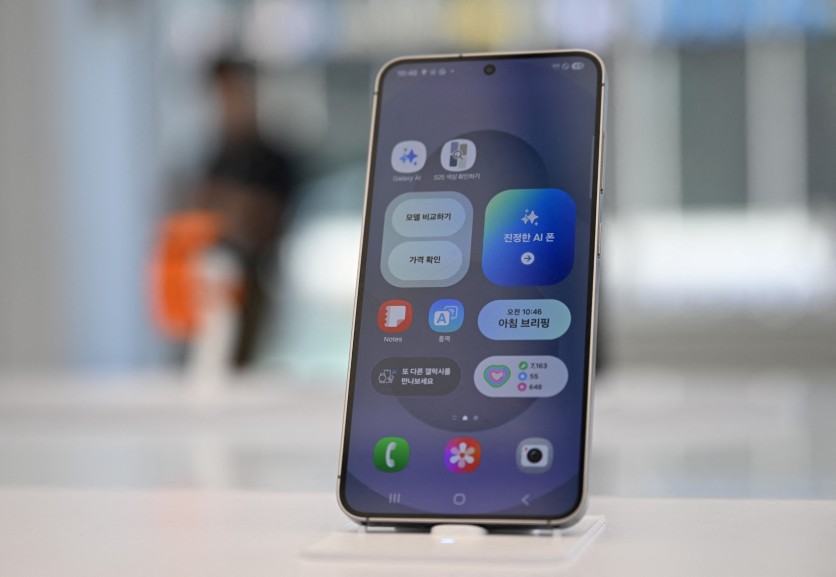
A Samsung Galaxy S25 smartphone is displayed at a Samsung store in Seoul on July 8, 2025. JUNG YEON-JE/gettyimages.com
Samsung opened its One UI 9 beta program to the Galaxy S25 series on September 1, 2026, giving the company's largest installed base of current flagship owners their first hands-on look at Android 17 — weeks ahead of a stable release that historical patterns suggest will arrive in mid-to-late September. The same expansion covers the Galaxy Z Fold 7 and Galaxy Z Flip 7, with beta builds for those 2025-generation foldables rolling out as of September 2. Samsung's official beta expansion covers six devices across four markets.
Before diving into what this update brings, one correction to how this story has been covered elsewhere: if you own a Galaxy S25, Z Fold 7, or Z Flip 7, bidirectional AirDrop sharing with iPhones and Macs is not new with One UI 9. It arrived on your device with One UI 8.5 in May 2026, built directly into the Quick Share framework using Apple's AWDL (Apple Wireless Direct Link) protocol, with Quick Share AirDrop expansion confirmed for the S25 and Z7 families that spring. The genuinely new One UI 9 additions for these devices — the ones that actually matter to your daily experience — are different, and they're worth understanding before you decide whether to enroll in the beta now or wait for stable.
What Beta Participants Can Test Starting Now
Samsung's official enrollment for the One UI 9 beta program requires the Samsung Members app. In the app, navigate to the Notices section, look for the One UI 9 Beta Program banner, and follow the enrollment prompts. Once enrolled, the beta firmware arrives as an over-the-air update in Settings > Software Update. The Samsung Members enrollment guide walks through each step.
The first beta build — carrying build versions ending in ZZHL or DZHK and weighing roughly 3.86 GB — launched in South Korea, India, and the United Kingdom on September 1, with the United States following. One important caveat for US Galaxy S25 owners: the initial beta wave is limited to factory-unlocked (U1) models, per the US beta factory-unlocked restriction confirmed by Samsung Care Ambassadors; carrier-branded devices from AT&T, Verizon, T-Mobile, and others are not yet eligible, though Samsung's historical pattern is to expand carrier support in subsequent beta builds.
The Galaxy S25 Edge — Samsung's ultra-slim variant of the S25 lineup — is absent from the beta expansion, with the S25 Edge excluded from beta per SamMobile's coverage. Samsung has not confirmed whether or when it will join the program.
The officially announced four markets for this expansion are India, South Korea, the United Kingdom, and the United States, with availability and timing varying by market per Samsung's standard language.
Beta 1 Changelog: What Changed in the First Build
The first One UI 9 beta for the Galaxy S25 series contains no new Galaxy AI features. What it does deliver, per the Galaxy S25 Beta 1 changelog published by SamMobile, includes several meaningful quality-of-life improvements.
Quick Panel: Users can now rearrange controls more freely, resize the brightness and volume sliders, resize the media player, and separate the sound mode button from the volume slider — a meaningful quality-of-life change for anyone who has found the default Quick Panel layout difficult to reach one-handed.
Samsung DeX: Moving app windows between desktops now has a dedicated menu at the top of each window. Desktop previews appear at the top of the Recents screen, making workspace switching faster.
Samsung Notes: A new Tape feature lets you conceal portions of a note and reveal them selectively — useful for study and review. Several new pen styles expand the drawing and handwriting toolkit.
Privacy: A blue indicator now appears at the top of the screen whenever an app accesses your location. Tapping it in the Quick Panel identifies which app is responsible — a privacy transparency feature that improves on the existing microphone and camera indicators.
Accessibility: Text Spotlight lets you tap any text on screen to see it enlarged in a separate window, with configurable font size and colors. A new Select to Speak feature lets you tap any item — text or an image — to hear it read aloud, without enabling full TalkBack. The unified TalkBack package, which merges Samsung's and Google's screen-reader implementations into a single updatable app, is also part of this build.
What One UI 9 Actually Adds That S25 Owners Don't Have Yet
Beyond the Beta 1 changelog, One UI 9 brings several capabilities that will roll in across subsequent builds before the stable release. For Galaxy S25 owners specifically, the additions that do not duplicate One UI 8.5 features include:
Expanded Smart Switch QR migration: One UI 9 extends the existing QR code migration tool to cover passwords and passkeys, call history, accessibility settings, and eSIM data — all transferable wirelessly from an iPhone, with no app required on the iPhone side. The PhoneArena One UI 9 features tracker confirms this expansion and is the genuinely new interoperability story for cross-platform switchers.
Android 17 performance improvements: One UI 9 is built on Android 17 (API level 37), which ships a redesigned garbage collector in the Android Runtime. The Android 17 generational GC announcement describes how the new approach separates short-lived objects from long-lived ones and runs frequent, lightweight sweeps of the young-generation heap rather than expensive full-heap scans. The practical result is reduced UI stutter — fewer dropped frames during fast scrolling and app switching — along with lower CPU usage and improved power efficiency. Android 17 also introduces a lock-free MessageQueue; the Android 17 lock-free MessageQueue post explains how this allows UI threads to proceed independently rather than waiting in sequence, and Automatic Feedback Directed Optimization (AutoFDO) in the kernel optimizes CPU scheduling using real device usage patterns rather than theoretical workloads.
Now Nudge: One UI 9 replaces Now Brief with Now Nudge, a proactive suggestion widget that surfaces context-aware reminders and recommendations throughout the day rather than presenting a static daily summary, per Galaxy S26 One UI 9 stable coverage.
Gemini Intelligence: The agentic AI layer that chains multi-step tasks across more than 40 supported apps from a single natural-language prompt arrives with One UI 9. The Gemini Nano v3 hardware requirements set a minimum of 12 GB of RAM; the Galaxy S25, Z Fold 7, and Z Flip 7 all carry 12 GB and will receive the full Gemini Intelligence experience — unlike some older devices that will receive One UI 9's other features but not the agentic AI layer.
Gemini Notebook and Ask AI: A consolidated Gemini Notebook workspace for notes and research threads arrives alongside an "Ask AI" feature in Samsung Internet Browser. The Ask AI Perplexity integration details confirm the feature is expected to be powered by Perplexity AI, surfacing contextual answers based on whatever page the user is reading.
Warranty & Care Hub: A new Settings panel consolidates device warranty status, support tickets, and Samsung Care+ enrollment.
Samsung Notes tape and pen styles: Additional creative and organizational tools expand on what Beta 1 introduces.
Android 17 and the Large-Screen Mandate
For Galaxy Z Fold 7 owners, there is an additional Android 17 benefit that does not apply to the slab form factor. The Android 17 large-screen resizability mandate requires that apps targeting API level 37 can no longer opt out of adapting to large-screen displays. Any app on Google Play that updates to target Android 17 must adapt its layout to the Z Fold 7's 7.6-inch (19.3 cm) unfolded inner display rather than letterboxing into a phone-proportioned window. This change accelerates a practical problem foldable owners have lived with since the category's debut: apps that ignore the inner screen and display as a stretched phone-sized window in the center.
Should You Enroll Now or Wait for Stable?
The beta enrollment decision comes down to a few practical factors.
Enroll if: you want hands-on access to the new Quick Panel layout, the DeX improvements, and the privacy features now; you are on a factory-unlocked US model or outside the US; and you are comfortable with the standard beta risks — battery drain, UI glitches, occasional overheating, and the possibility that banking apps requiring biometric authentication may behave unexpectedly during the beta period.
Wait for stable if: you are on a US carrier-branded device (you have no choice but to wait for now); you rely on your phone for banking, work, or two-factor authentication and cannot afford temporary app instability; or you have a Galaxy S25 Edge (stable arrival date is not yet confirmed for that model).
When does stable arrive? The S26 stable One UI 9 confirmed post from Samsung's community forum on September 1 indicated the release was "coming soon." If the S25/Z7 series follows the cadence established in Samsung's prior update cycles — the S25 series received Android 16 (One UI 8.5) in mid-September 2025, followed quickly by the S24 series before the month ended — S25 owners can expect stable One UI 9 notifications to arrive in mid-to-late September 2026. That is roughly four to six weeks away.
Devices Not Getting One UI 9
Samsung has confirmed that the Galaxy S22 series and Galaxy S21 FE have reached the end of their major OS upgrade eligibility. The Galaxy S22 final OS confirmed by Tech-ish: the Galaxy S22 shipped in early 2022 with a four-generation OS update commitment, and Android 16 (One UI 8) was its final major system upgrade. The Galaxy S21 FE is similarly excluded.
Galaxy A-series and Galaxy Tab devices are expected to begin receiving One UI 9 in a later phase, with rollouts anticipated through the fourth quarter of 2026.
Read more: Galaxy S26 One UI 9 Stable Release Confirmed: AirDrop and Gemini AI Coming
Under the Hood: Why Android 17 Feels Noticeably Smoother
For a technically oriented reader, the performance improvement story in Android 17 is worth understanding at the mechanism level, because it explains why One UI 9 will feel faster even on a Galaxy S25 that already runs One UI 8.5 well.
Prior versions of the Android Runtime used a "stop-the-world" garbage collection approach for much of the heap: when the memory manager needed to reclaim space, it paused all application threads, scanned the full heap, and then resumed. On a phone displaying 120 frames per second, a GC pause lasting even a few milliseconds produces a dropped frame. Android 17's generational GC avoids this by partitioning objects into a short-lived "nursery" and a long-lived "tenured" space. Objects that survive their first few allocations are promoted from nursery to tenured; the nursery is swept frequently and cheaply, because it contains only the youngest objects. The tenured heap is scanned infrequently. The net effect is that the pauses that cause UI stutter become both shorter and rarer.
The lock-free MessageQueue change addresses a separate bottleneck. In Android's UI threading model, the main thread processes a queue of messages — view redraws, touch events, animations — in sequence. Under the prior implementation, if one handler in the queue ran long (a slow network callback, an image decode), it blocked everything behind it. The lock-free version allows the scheduler to skip stalled operations and process ready ones, keeping the UI responsive under load.
Read more: Galaxy S26 One UI 9 Beta 4 Expected June 30: Android 17 Stable Speeds July Release
Frequently Asked Questions
Does the Galaxy S25 already have AirDrop support before One UI 9?
Yes. Bidirectional AirDrop file sharing between Galaxy S25 devices and iPhones, iPads, and Macs arrived with One UI 8.5 in May 2026, built into the Quick Share framework using Apple's AWDL protocol. One UI 9 does not introduce this capability to the S25 — it was already there. What One UI 9 adds on the cross-platform front is the expanded Smart Switch QR migration tool, which now covers passwords, passkeys, call history, accessibility settings, and eSIM data transferred wirelessly from an iPhone.
How do I join the Galaxy S25 One UI 9 beta program?
Open the Samsung Members app on your Galaxy S25, S25+, S25 Ultra, S25 FE, Z Fold 7, or Z Flip 7. Navigate to the Notices section and look for the One UI 9 Beta Program banner. Follow the on-screen enrollment instructions and accept the terms. Once accepted, the beta firmware will appear in Settings > Software Update. Note that in the United States, the beta is currently available only on factory-unlocked (U1) models, not on carrier-branded variants. Availability is confirmed in India, South Korea, the United Kingdom, and the United States, with timing varying by market.
Will Galaxy S25 owners get the full Gemini Intelligence experience with One UI 9?
Yes. Gemini Intelligence — the agentic AI layer that chains multi-step tasks across more than 40 apps from a single natural-language prompt — requires Gemini Nano v3 hardware with at least 12 GB of RAM. The Galaxy S25, S25+, S25 Ultra, Galaxy Z Fold 7, and Galaxy Z Flip 7 all carry 12 GB of RAM and meet this requirement. Galaxy S24 series devices, which some older sources listed as having 8 GB variants, will need to be confirmed individually; the S24 Ultra's 12 GB configuration qualifies.
What is technically different about Android 17 compared to Android 16?
Android 17 (API level 37) introduces three principal performance improvements at the platform level. First, a redesigned generational garbage collector in the Android Runtime replaces full-heap stop-the-world scans with frequent lightweight sweeps of a short-lived object nursery, reducing the GC pauses that cause dropped frames. Second, a lock-free MessageQueue prevents slow thread handlers from blocking UI processing for other threads. Third, Automatic Feedback Directed Optimization (AutoFDO) in the kernel uses real device usage data to tune CPU scheduling — speeding up app launches and background processing without relying on theoretical workloads. Android 17 also mandates that apps targeting API 37 must support large-screen resizability, a change particularly significant for Galaxy Z Fold 7 owners whose apps previously letterboxed on the inner display.

-
 C114 Communication Network
 -
 Communication Home
