Search


Nest.com
Google will retire the Nest app on January 25, 2027, and will begin deleting Nest accounts that are not linked to a Google Account after March 25, 2027, according to Google's retirement page. Saved clips in the Nest web library will not move to Google Home, and Google's own account help page says a deleted account loses its Google Home Premium camera history for good, with no backups, and leaves cameras, doorbells and Nest x Yale locks unable to work as they do today.
Google announced the changes Friday, November 20, in a post on its Google Home & Nest Community forum. Coverage that day included 9to5Google's Nest app report, Android Authority's deadline story, Android Central's deadline report and Digital Trends' owner guide. As of November 23, owners have 63 days to download clips and 122 days to link an old account to Google.
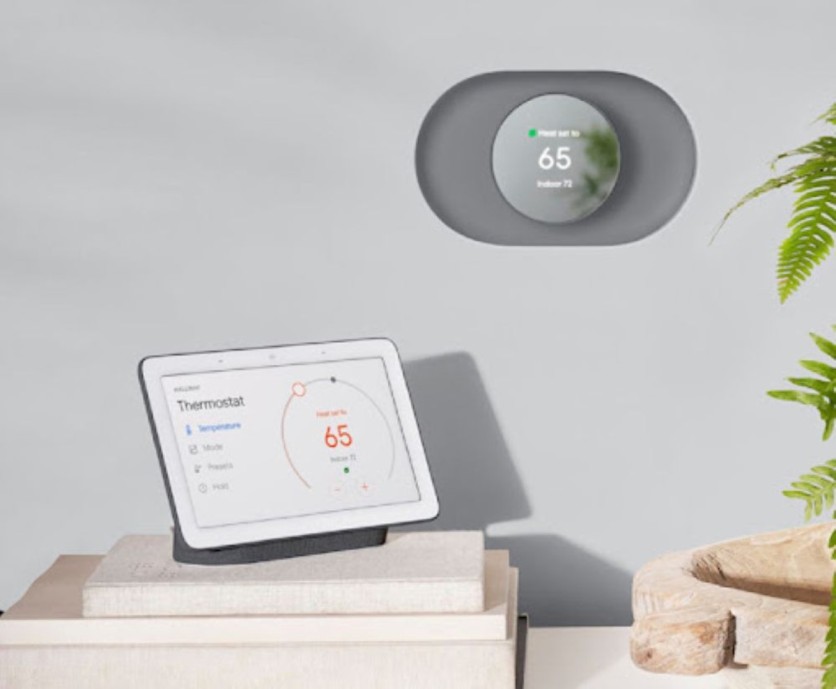
The retirement covers the Nest app on Android and iOS and the home.nest.com website, and Digital Trends reports it covers its TV app too. Control of Nest thermostats, cameras, doorbells, smoke and CO alarms and the Nest x Yale lock moves to the Google Home app and home.google.com. Devices keep working at home either way, but remote control requires Google Home and a Google Account, so owners who have not switched cannot view or control them remotely.
Saved Clips Do Not Transfer, and One-Click Download Disappears With home.nest.com on January 25
Clips saved manually in the clip library on home.nest.com will not move to Google Home. Google tells owners to use the site's one-click Download All button before January 25. After the switch, the web version of Google Home lets users download clips up to five minutes long.
Digital Trends and TNW report that time-lapses and email notifications will not carry over either. Google's retirement page does not mention either one. Regular event and 24/7 video history is different. Android Authority says it should appear in Google Home on its own.
Anyone who keeps footage of break-ins, deliveries or family moments in that library has one route Google lists for keeping it, and that route runs through a website that closes on the same day as the app.
Thermostats, Cameras, Doorbells, Alarms and Locks Move Automatically on January 25
Google's retirement page lists the devices that transfer automatically:
- Thermostats: Nest Learning Thermostat (3rd and 4th gen), Nest Thermostat E, Nest Thermostat (2020) and Nest Temperature Sensor (1st and 2nd gen)
- Cameras and doorbells: Nest Cam Indoor and Outdoor (1st gen, wired), Nest Cam IQ Indoor and Outdoor, Nest Hello (1st gen, wired), the Nest Hub Max camera and every Nest camera and doorbell launched in 2021 or later
- Smoke and CO alarms: Nest Protect (2nd gen), supported through its printed expiration date
- Locks: Nest x Yale Lock with Nest Connect
Settings and schedules move with the devices. Event and 24/7 video history stays viewable until it reaches its standard 30-day or 60-day expiration window. ADT-monitored systems are unaffected because they do not use the Nest app, Google says.
Nest Secure, whose support Google ended April 8, 2024, does not appear on the list.
What Happens to Nest Accounts That Miss March 25 Deadline?
Google Home requires a Google Account. Accounts created after August 19, 2019 already use one. Owners who still see a "Sign in with Nest" screen and a separate Nest password must run "Migrate to a Google Account" in the Nest app's settings.
Google says accounts not linked by March 25, 2027 will have their data and subscriptions deleted, with deletions processed after that date. Owners can still download or delete data before then.
Google Help Page: Account Deletion Erases Premium Camera History and Strips Remote Lock Control
Google's retirement page does not say what deletion does to devices. Its separate account FAQ does, in its section on deleting an account, which covers both Google Account sign-ins and non-migrated Nest accounts. The retirement page does not connect the March 25 deletions to those outcomes.
For Google Home Premium subscribers, camera video history is erased along with markers and snapshots, and Google says, "We don't keep backups." The FAQ describes what happens to devices after deletion:
- Thermostats: Temperature changes, motion-based Eco switching and schedules keep working. The thermostat also keeps Wi-Fi details and sends data and its IP address to Google's servers while connected.
- Nest Protect: Alarms that were wirelessly interconnected keep working.
- Nest x Yale Lock: The lock works as a basic keyless lock and loses passcode management, history and remote locking.
- Cameras and doorbells: They do not work without an account and resume only after being added to another account.
The pattern follows where each function runs. Schedules and keypad operation live on the device, while camera video and remote lock control run through Google's servers. One wrinkle: the FAQ's instruction for re-adding a camera or doorbell refers to the Nest app, which retires January 25.
Matter, the interoperability standard Google supports, is built to always allow local control as an option. Google's retirement page mentions Matter devices but does not say whether Nest devices will offer local control.
Account Migration Cannot Be Undone, and Full Access Members Must Be Re-Invited
Google's FAQ calls migration optional, yet the retirement page ties unlinked accounts to deletion. Once completed, migration cannot be reversed: a linked Google Account and Nest account cannot be unlinked, and only one Google Account can link to one Nest account.
A personal Google Account gives full functionality. Google Workspace accounts can be linked, but some features may be unavailable, and losing access to a Workspace account means losing access to the home and its devices. Accounts already linked to another Nest account, group and alias accounts, unverified accounts, accounts for children under 13 and accounts managed through Family Link cannot be used.
When the home owner migrates, members with Full Access lose access and must be re-invited if they have Google Accounts, and all other members must also migrate and be re-invited. Nest Aware (1st gen) subscribers move to Google Home Premium Advanced on January 25 at no added cost, and Google says no credit-card re-entry is required at this time.
Google Assistant Retires on Nest Speakers August 2, 2027: Gemini for Home Switch Is One-Way
Google Assistant will retire on speakers and smart displays on August 2, 2027, replaced by Gemini for Home, according to Android Central's deadline report. The same date appears in 9to5Google's August 2 coverage, Digital Trends' owner guide and TNW's Nest app report. Basic Gemini for Home features are free, but Google's help page says a switched home cannot go back to Google Assistant.
Early access has been open to U.S. users since October 28, 2025, and Gadgeteer reported switching is permanent for that home. Gemini Live, the full conversational mode, requires a Google Home Premium subscription and runs on the Nest Hub (2nd gen), Nest Audio, Nest Mini (2nd gen) and Nest Hub Max. The Nest Wifi point, Home Max and original Google Home get most Gemini for Home features without it.
Google has not said which older speakers and displays will receive every feature, according to TalkAndroid's older-device report, and 9to5Google says more details will come closer to the deadline. Google's earlier phase for phones began September 4, 2026, and TechTimes reported at the time that smart speakers and displays sat outside it.
Thermostat Cutoff Precedent Draws Proposed Class Action Alleging Missing Disclosure
Google says it is consolidating so it can focus engineering, security and feature work on one app. Owners have heard a version of that before. Google opened Nest account migration to Google Accounts on August 19, 2019. On October 25, 2025, Google ended support for 1st and 2nd gen Nest Learning Thermostats, which lost phone and Assistant control but kept running as wall-mounted thermostats with manual control. A Reddit user quoted by Digital Trends objected to "forcing you to migrate to Google and then killing the app."
A proposed class action over that thermostat cutoff alleges Google failed to disclose at the point of sale that it could disable the devices, and that it acted to push customers toward newer thermostats. ClassAction.org reported the 25-page complaint on April 2, 2026. The proposed class covers U.S. buyers of 1st or 2nd gen units who still owned them on October 25, 2025. The report describes no ruling, settlement or class certification and includes no Google response.
PCWorld reported in April 2025 that Google had discontinued Nest Protect and the Nest x Yale lock about a month before announcing the thermostat cutoff, though both remain on Google's migration list. Android Authority anticipates more grumbling from holdouts once the Nest app closes.
FTC Found 11.4% of Smart Products Disclosed Support Length; Massachusetts Bill Would Require Notice
A November 2024 FTC staff review of 184 connected products across 64 categories found that 21 of them, or 11.4%, disclosed the support duration or end date on the product web page. Consumer Reports' model legislation would require makers to notify consumers in advance when support will end and to advise them on handling the device afterward.
Massachusetts House Bill 5114, filed January 16, 2026 by Rep. David M. Rogers and Sen. William N. Brownsberger, would require makers to disclose a minimum guaranteed support period, bar them from shortening it after sale and give at least six months' notice that lists the features that will stop working. A House order authorizing committee study was reported on August 24, 2026, and the records reviewed do not show enactment. Owners get 66 days between Google's November 20 announcement and the January 25 app retirement, while the 2025 thermostat cutoff came about six months after Google's April 2025 announcement.
Four Steps Before January 25: Download Clips, Link Account, Install Google Home, Re-Invite Members
- Open home.nest.com and use Download All for saved clips before January 25.
- If the Nest app shows "Sign in with Nest" and a separate password, run "Migrate to a Google Account" in its settings, ideally with a personal Google Account, well before March 25.
- Install the latest Google Home app and confirm each camera, thermostat, doorbell, alarm and lock appears.
- After migrating, re-invite members who had Full Access.
Owners who do nothing keep local device operation but lose remote access on January 25 and, if an account is still unlinked after March 25, face deletion of the account, its subscriptions and, per Google's help page, Premium camera history with no backups. Saved clips are the item Google says will not transfer, so the download comes first. The Assistant retirement on August 2, 2027 is a separate, later decision, and the free Gemini for Home switch cannot be undone.
Frequently Asked Questions
Will my Nest devices still work if I do nothing before January 25?
Devices keep working in the home, but remote viewing, control and notifications will require the Google Home app or home.google.com and a Google Account. Accounts still unlinked after March 25 face deletion, and Google's account help page describes deleted accounts losing camera history and leaving locks and cameras degraded.
How do I download saved Nest clips before January 25?
Sign in at home.nest.com and use the one-click Download All button in the clip library. Google's retirement page does not list time-lapses or email notifications, which Digital Trends says will not transfer and TNW's report also lists.
Do I have to link my Nest account to a Google Account?
Google calls migration optional, but accounts not linked by March 25 face deletion, and a completed link cannot be undone. A personal Google Account gives full functionality, while a Workspace account may lack features.
Can I switch back to Google Assistant after moving to Gemini for Home?
No. Google's help page says a switched home cannot go back to Assistant. Google is retiring Assistant on speakers and displays on August 2, 2027.

-
 C114 Communication Network
-
 Communication Home