
 Search

Credit: Andrew Cunningham
Intel’s Core Ultra lineup of desktop and laptop processors has been frustrating to review. None of them has been across-the-board awful or totally without redeeming qualities. But Intel has struggled mightily this decade to produce new processors that are straightforward, easy-to-recommend improvements over their predecessors.
The company’s 12th- and 13th-generation Core chips offered big boosts to CPU performance over the 11th-generation CPUs, for example, but they also usually came with a significant hit to battery life, and they only minimally improved the GPU. The first-generation Core Ultra chips, codenamed Meteor Lake, improved the GPU but couldn’t beat the CPU performance of older chips. Last year’s Core Ultra 200V series, codenamed Lunar Lake, boasted good battery life and solid graphics performance but weaker CPU performance; better-performing Core Ultra 200H chips (codenamed Arrow Lake) improved CPU performance but came with lesser GPUs and some other missing features.
The Core Ultra Series 3 processors, codenamed Panther Lake, finally put an end to the years of uneven zig-zagging advancement we’ve seen in the last half-decade.
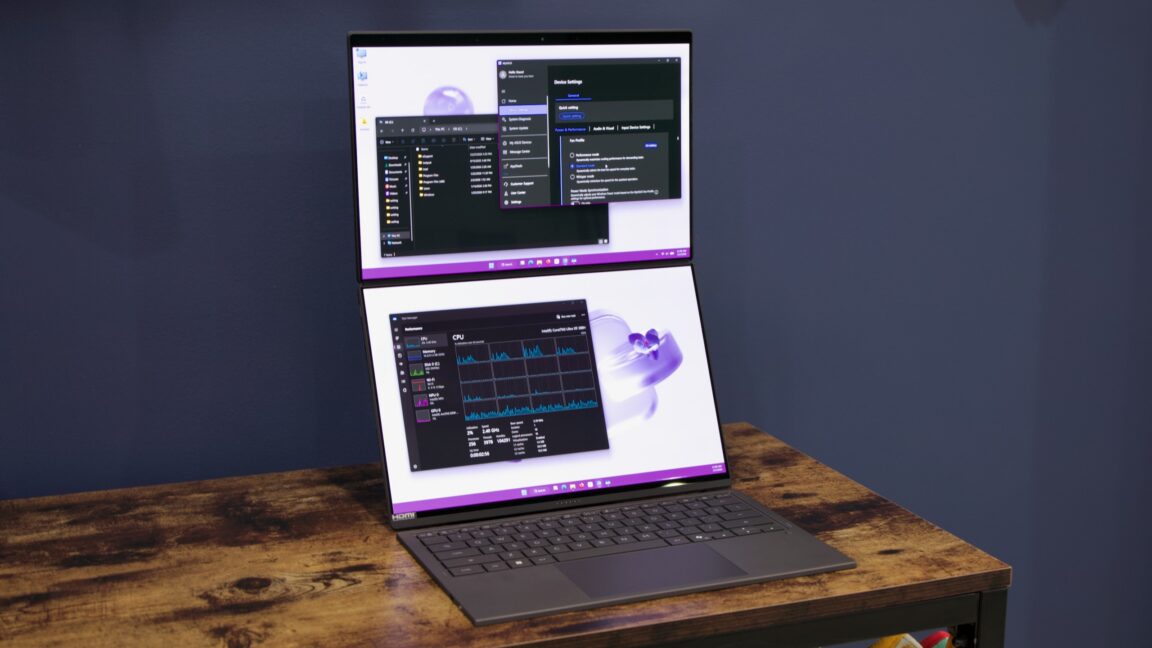
Intel provided us with its best Panther Lake chip for testing—a Core Ultra X9 388H, ensconced in the odd-but-compelling Asus Zenbook Duo UX8407. And at least in this form, Panther Lake is mostly excellent, with CPU and graphics performance that easily outstrips the last few generations of Intel chips and is more than competitive with AMD’s Ryzen AI 300 and 400 processors. Power efficiency and battery life are also excellent, at least based on our sample size of one laptop.
In the long term, Intel needs Panther Lake to become the new normal rather than an aberration—a foundation for steady, predictable iteration instead of a one-off. Given Intel’s struggles over the last decade, I’ll believe that’s happening when I see it.
But in the short term, the good news for laptop buyers is that Core Ultra Series 3 chips are good, modern laptop processors with good performance and consistent feature sets, spoiled only by the fact that they’re launching amid a nightmarish RAM shortage and that Intel is apparently having problems making enough of all of its processors to meet consumer demand.
The Asus Zenbook Duo, in brief
The UX8407 is not the first Zenbook Duo—Asus has released a few different laptops with this basic design at this point. But since this is my first time using it, I’ll share some thoughts up front.
The Zenbook Duo reminds me of the kinds of computer designs PC makers were trying during the Windows 8 era, which I mean as a compliment, despite that operating system’s generally negative reputation. Not all of these designs hit, and many of them suffered because they tried too hard to emulate an iPad-like tablet experience at the expense of the PC’s keyboard-and-pointer-driven strengths. The most enduringly popular designs that originated in that era—the Microsoft Surface, with its kickstand and removable keyboard cover, and the Lenovo Yoga’s 360-degree hinge—thought beyond the traditional ’80s-and-’90s-era clamshell laptop design without totally throwing it out.
The Duo does the same thing—its default mode is a chunky-ish clamshell laptop with a keyboard and trackpad attached magnetically over the second screen. These kinds of keyboard covers occasionally stand out for their unsatisfying key travel or otherwise strange typing feel, but the Zenbook in clamshell mode feels about as comfortable to type on as other Zenbooks, ThinkPads, Surface Laptops, or MacBook Airs I’ve tried recently.
It’s only when this keyboard is removed that the second screen lights up. The keyboard and trackpad cover connects via Bluetooth, and a kickstand on the bottom folds out to lift both screens and reduce the device’s footprint. During my testing, I often found myself using its stand just to elevate the primary display, turning the secondary screen off.
It’s an undeniably useful feature, particularly for those who split their time between a laptop and a multi-monitor desktop setup. And the added utility is enough to offset the downsides of the design: it’s slightly bulky and heavy for its screen size, it offers a usable-but-minimalist allotment of ports (two Thunderbolt 4, one HDMI, one USB-A, and a headphone jack), and it’s so distinctive-looking in dual-screen mode that it will attract extended looks and chatty strangers when you use it in public.
Previous versions of this laptop got dinged in reviews for their less-than-stellar battery life—the screen is one of the most power-hungry components in most devices, so it stands to reason that adding a second one would put a pretty big dent in your runtime. Asus has partially addressed that issue in the Panther Lake version by throwing more battery at the problem—the UX8407 uses a 99 WHr battery rather than the 75 WHr battery in the UX8406, pushing right up against the 100 WHr limit that is legally permitted on planes without pre-approval from the airline. Bear that in mind when we compare Panther Lake’s battery life to its predecessors and competitors.
Panther Lake vs. Lunar Lake vs. Arrow Lake
Per Intel and AMD’s standard practice, Core Ultra Series 3 is a maze of slightly different silicon, offering a pretty wide range of possible processor and graphics performance levels under the same broad banner. But it does at least help to remove the biggest dividing line in Core Ultra Series 2: the one between the Core Ultra 200V chips, codenamed Lunar Lake, and the Core Ultra 200U/200H chips, codenamed Arrow Lake.
The Lunar Lake chips used Intel’s then-newest integrated GPU architecture and were the only Core Ultra Series 2 chips with a neural processing unit (NPU) fast enough to clear Microsoft’s Copilot+ PC performance requirements. But they also topped out at eight CPU cores (four P-cores and four E-cores)—perfectly fine for everyday use, but it meant that even 12th- or 13th-generation Intel Core CPUs could occasionally outrun the Core Ultra 200V series in multi-threaded tasks.
Arrow Lake offered a beefed-up processor with up to 6 P-cores and 10 E-cores. But its integrated graphics were based on an older, less capable architecture, and it had a slower NPU that didn’t qualify it for Copilot+ features. Both of these shortcomings were also true of the Core Ultra 200U series, which had 12 CPU cores (2 P-cores, 10 E-cores) and was aimed at slightly lower-end systems.
The lineup exemplified both the benefits and disadvantages of Intel’s chiplet-based approach to laptop processors. On the one hand, Intel could essentially mix and match new processor cores and building blocks from the older Core Ultra 100-series chips to make new processors that fit a wider variety of use cases. On the other hand, very few people buying a Core Ultra Series 2 chip were actually getting all of Intel’s latest and greatest designs. It made them awkward competitors for AMD’s Ryzen AI 300 series or Qualcomm’s Snapdragon X Elite and Plus, which did offer the same CPU and GPU architectures and the same NPU across the entire lineup.
The Core Ultra 300-series fixes all of this. You still have a wide range of possible CPU and GPU core counts—and the top-end Intel Arc B380 and B370 GPUs appear in just a handful of chips—but all of the architectures and basic capabilities are the same. All Core Ultra Series 3 processors support Copilot+. It would be too generous to describe the lineup as “simple” or “straightforward,” but there’s less fine print to be aware of than before.
CPU performance and power: Two Panther Lakes
Intel’s chips usually have two “power level” numbers that determine their power usage and performance level. Power Level 1 (PL1) is effectively the “base” power level, the amount of power the chip can use under sustained heavy load, while Power Level 2 (PL2) is the maximum amount the chip can use when Turbo Boosting.
Many laptops can change their PL1 and PL2 values a bit to give users a range of performance options, either through Windows’ built-in power plan settings or a proprietary app. Higher power limits mean higher performance, usually at the expense of battery life, more fan noise, and hotter temperatures.
For Asus’ laptops, this is handled through the MyAsus app, which offers three performance levels for the UX8407. There’s the default “standard” mode, which sets PL1 and PL2 at 42 W and 55 W, respectively. “Performance” mode sets PL1 and PL2 at 55 and 64 W, and “whisper” mode sets them at 30 to 35 W.
We’ve run most of our tests in “performance” mode to give Panther Lake the opportunity to make the best possible case for itself. But most of the chips we’re comparing it to have power profiles a bit closer to the “whisper” mode settings. In the interest of making better apples-to-apples comparisons with past Intel chips and competing chips from the likes of AMD, Qualcomm, and Apple, we’ve run many of our tests in both modes.
AMD has argued that the Panther Lake chips should be compared not to the regular Ryzen AI Max 300 and 400-series CPUs (codenamed Strix Point and Gorgon Point, and both based on essentially identical silicon) but to the larger and more powerful Ryzen AI Max+ chips and their Radeon RX 8060S and 8050S GPUs (codenamed Strix Halo).
The only Strix Halo system we currently have on hand is a Framework Desktop, which has higher power limits and more cooling capacity than most laptops—we’ve included some numbers in our gaming benchmarks, but we mostly left it out of the CPU charts because it wouldn’t be a fair comparison. (AMD tried to send us a Ryzen AI Max+ equipped laptop to test, but as of this writing, it’s still hung up in FedEx’s network somewhere thanks to the winter storm that dumped snow all over the eastern United States last weekend.)
Panther Lake’s single- and multi-core CPU performance blows past all of its direct competitors, including AMD’s Ryzen AI 9 HX 370, the last few generations of Intel mobile processors, and the Qualcomm Snapdragon X Elite (though the recently announced X2 Elite could change things).
Single-core performance is around 10 percent faster than Core Ultra 200V, the Ryzen AI 9 HX 370, and the Snapdragon chip. The only chips that make Intel’s look bad here are Apple’s—both the M4 and M5 boast considerably higher single-core performance.
The Core Ultra X9 388H’s multi-core performance is also very good, though this is where your laptop’s cooling system and power levels will make the biggest difference. In Asus’ Performance Mode, Panther Lake is around twice as fast as the Lunar Lake-based Core Ultra 7 258V and 80–90 percent faster than older 12th- and 13th-generation Core processors and the Meteor Lake-based Core Ultra 7 155H, depending on the test. Compared to the Ryzen AI 9 HX 370, Panther Lake is between 10 and 40 percent faster, again heavily dependent on the test.
But our Handbrake video encoding test also shows the processor consuming a little over 50 W of power, which is usually 20 or 25 W more than all those other chips.
In the lower-power “whisper” mode, the processor consumes closer to 25 W on average during the Handbrake test, putting it on even footing with the other chips. It still transcoded the video more quickly than any of the other processors, except for the Ryzen AI Max+ chip, which has desktop-level power limits.
Panther Lake’s performance at this ~30 W TDP level is still impressive—you get around 95 percent of the single-core CPU performance and 75–85 percent of the multi-core CPU performance, and the processor uses about half as much power under heavy load. And while the Ryzen AI HX 370 gets much closer to Intel’s performance in this mode, Panther Lake still manages to surpass it most of the time.
In terms of power efficiency in our Handbrake video encoding test, Panther Lake ranges from “solid” in performance mode to “excellent” in whisper mode. In performance mode, it uses roughly the same amount of power as older Intel chips but performs the work nearly twice as fast. In whisper mode, performance slows down a little, but the chip only uses around two-thirds as much power to complete the task. The only chips that beat Intel’s efficiency here are Apple’s; as solid as Panther Lake is, I doubt anyone at Apple is looking at Panther Lake and regretting the decision to bring chip designs in-house.
Graphics performance
Panther Lake chips will all come with one of two graphics tiles: One is a 12-core tile manufactured by TSMC, which has also handled Intel’s other high-performance graphics tiles and the dedicated Arc GPUs—this is the Arc B390 GPU. The other is a four-core tile made by Intel itself, which, per Intel tradition, gets the bland and undifferentiated “Intel Graphics” branding. Both will also come in cut-down versions—a 10-core Arc B370 in the Core Ultra 5 338H, and two-core versions in the lowest-end chips—but they’ll be rarer than the fully-enabled versions.
To help alleviate memory bandwidth issues, Intel allows systems with B390 GPUs to support high-speed LPDDR5X-9600 (up from LPDDR5X-8533 in other chips), and it doesn’t allow the B390 to be used with slower socketed DDR5 DIMMs at all. AMD’s Ryzen AI Max+ chips also require high-speed soldered-down LPDDR5X to help alleviate the memory bandwidth limitations that normally hold back integrated GPUs. But it’s not clear how common the Arc B390 will be—it may be more difficult to launch systems that require specific high-speed RAM during a historic memory supply crisis.
All of that said, the B390 is an impressive performer, particularly in the Zenbook’s “performance” mode. Across both synthetic graphics benchmarks and benchmark runs in Borderlands 3, Shadow of the Tomb Raider, and Cyberpunk 2077, Panther Lake’s GPU is nearly twice as fast as Lunar Lake’s Arc 140V GPU and over twice as fast as the Arc GPU in the Core Ultra Series 1 Meteor Lake chips.
It’s also around twice as fast as the Radeon 890M GPU in the Ryzen AI 9 HX 370. In Cyberpunk 2077, it’s closer to five times as fast, thanks to the game’s heavy ray-tracing effects and the AMD RDNA3 architecture’s struggle with some kinds of ray-tracing effects. The Arc B390 is still far from playable 1080p performance in Cyberpunk with RT effects on, but it will be easier to find the settings that make it playable than it would be on the AMD GPU.
Graphics performance shifts quite a bit based on the power mode you’re operating in—switching from the “performance” preset to “standard” cut average frame rates quite a bit, particularly in the tests run at 1600p. In “whisper” mode, games generally run between 66 and 75 percent as fast as they do in “performance” mode. The Arc B390 is still faster than the 890M and older Intel GPUs in this lower-power mode, but as with multi-core CPU performance, you are leaving a significant amount of speed on the table when you constrain Panther Lake’s power use and temperatures.
AMD has preemptively downplayed the Arc B390 GPU by insisting it be compared to the company’s Ryzen AI Max+ chips and their huge 40- and 32-core Radeon RX 8060S and RX 8050S GPUs, not the regular Ryzen AI 300 CPUs (and the barely changed 400-series) and the Radeon 890M GPU.
The increased power envelope of the Framework Desktop makes this comparison a bit lopsided, but it is flattering for AMD. The only place where the Arc B390 can come close to the Radeon 8060S is in Cyberpunk 2077 with ray tracing enabled. Elsewhere, the larger AMD GPU is something like 70–75 percent faster than Arc B390, though this gap would certainly shrink if the Ryzen chip were operating in the same power envelope as the Intel chip.
Power use and battery life
Intel has made it about as difficult as possible to directly compare the battery life of the Panther Lake system it provided us to the battery life of the Lunar Lake or Meteor Lake Zenbooks it sent for testing when those chips launched. We’re stuck trying to find good ways to compare a dual-screened system with a 99 WHr battery to more traditional single-screened clamshells with smaller batteries.
With both screens on, the UX8407 lasted for a respectable 12 hours in the PCMark Modern Office battery life test, which is way short of the Lunar Lake-based UX5406S’s 16-plus hours but pretty good for a system with a second screen draining the battery. With just one screen on, the UX8407 lasted for an impressive 17 hours and 30 minutes, but that’s just a 6 percent increase in runtime despite a 37.5 percent larger battery.
Since the UX8407 and the UX5406S have similar screen specs when only one screen is enabled, I did some rough math to estimate what Panther Lake’s battery life might be like when paired with the same battery as a Lunar Lake system. In this (very theoretical) scenario, the Panther Lake system would run for nearly 13 hours on a 72 WHr battery; that does represent a step down from Core Ultra 200V, and it wouldn’t be as competitive with Qualcomm’s Snapdragon X Elite, but it still looks good compared to Core Ultra Series 1 and the Ryzen AI CPU. As usual, battery life will vary quite a bit from system to system, depending on the other specs.
A respectable effort
Based on the performance of the high-end CPU in this Intel-provided Asus Zenbook, it’s safe to say that Panther Lake and the Core Ultra 3-series are Intel’s most impressive laptop chips in at least half a decade. The 11th-generation Core chips, codenamed Tiger Lake, were probably the last ones to introduce this kind of all-around CPU, GPU, and efficiency improvements simultaneously.
Finally, Intel seems to have released a series of chips that thoroughly outperform their predecessors, offer good battery life, and provide all the benefits of the company’s latest graphics architecture, along with a competitive NPU for on-device AI and machine learning workloads. And Intel has done so using its in-house manufacturing facilities for the most important parts (though not for everything).
All of this is unambiguously good news for Intel, which had staked its future on the viability of its 18A manufacturing process. And anyone buying a laptop in the next year or two can grab a system with a Core Ultra Series 3 chip and be reasonably sure they’re buying something that won’t require major compromises.
But the real test for the company will be what it does after this. Is Panther Lake a solid foundation that Intel will build on reliably year after year, the way it used to (or the way that Apple does now)? Or will Intel return to a pattern of lateral moves and dead-end design experiments, relying on third-party manufacturers to keep its chips competitive?
Panther Lake beats the Ryzen AI 300 series in just about every way, but that’s also a processor that has been around for 18 months, and Intel got lucky when AMD decided to release a boring refresh-in-name-only for this year’s laptop chips rather than pressing its advantage. We’ll need to wait two or three years before we can say whether this was the start of a turnaround for Intel or just a one-off launch where everything happened to go exactly right.

-
 C114 Communication Network
 -
 Communication Home
