Search


Anthropic
Anthropic has quietly expanded what its AI assistant can do in a way most people haven't fully grasped yet. The latest update is not just a new feature inside a chat window. It is a bridge between conversations with an AI and functional software that runs directly on a computer.
Anthropic Claude Artifact Rolls Out Now
Anthropic recently announced that Claude users can now turn their artifacts into native desktop applications for Mac and Windows, using a new "Install as app" feature rolling out in beta. The feature is accessible through the Share menu on any supported artifact inside the Claude desktop app.
The concept behind the feature is that artifacts, which started as one-off outputs like charts, web pages, and documents, have evolved into tools that many Claude users now rely on daily. Anthropic describes examples like a meeting prep page that regularly pulls from a user's calendar and email, or an order tracker that surfaces shipping priorities for the day. The idea is that if something has become a regular part of someone's workflow, it should behave like a proper app rather than a webpage buried inside a chat.
Each installed app gets its own icon and opens in its own window, separate from Claude itself. The app uses the user's existing Claude account rather than requiring a separate API key or login, and any requests the app makes to Claude count toward the user's plan's usage limits.
When the underlying artifact is updated or edited, the installed app updates automatically.
Create AI Desktop Apps With Claude Artifact
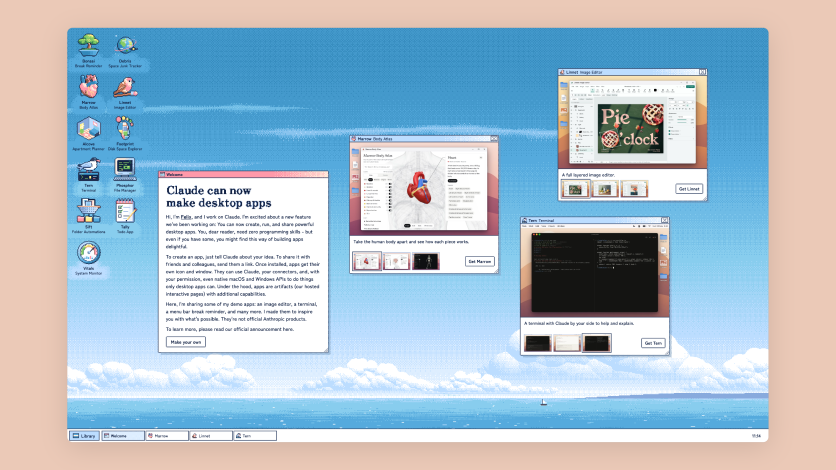
The practical range of what can be built through this feature is broad. Anthropic employees have demonstrated a full layered image editor called Linnet, a file manager called Phosphor styled after a cinematic aesthetic, a folder rule automation tool called Sift that uses Claude to keep files organized, a terminal called Tern that pairs Claude alongside command-line work, and a menu bar performance monitor called Vitals.
Those five examples illustrate the spread from creative tools to system utilities, all built through the artifact workflow.
Each installed app can use Claude AI and any connectors a user has configured, meaning the apps can tap into live data from connected services. Notifications and menu bar or system tray integration are available for apps that need to surface information proactively, such as alerting a user when something requires attention.
The creation process requires no traditional software packaging, code signing, or distribution setup. A user describes what they want Claude to build, tries it as an artifact, and then installs it as an app.
Anthropic has positioned this as lowering the bar for both knowledge workers who have never written code and developers who want to prototype tools quickly without handling infrastructure.
Anthropic Claude Artifact Is on Windows, Mac
The feature is currently rolling out in beta across all Claude plans, including Free, Pro, Team, and Enterprise, with some variations in default settings depending on the plan type. For Team plans, app installation is enabled by default, with full computer access permissions turned off until enabled by an admin. For Enterprise plans, the feature is off by default and must be turned on by an organization owner.
Anthropic has built three levels of permissions into the system to give users control over how much each installed app can interact with their computer. The default level restricts apps to what they could do inside a browser.
The app permissions level allows access to additional common features that Claude can tightly control, such as global keyboard shortcuts and persistent windows. The full computer access level allows apps to run programs and access files without asking each time, but Anthropic limits this level to apps the user created themselves or, in Team and Enterprise environments, apps made by people within the same organization.
One important caveat governs how permissions work across updates. Because each permission only covers the current version of an app, Claude will ask again for permission after any update, including edits made by the user. If part of an app loads from a third-party website, that portion can change without triggering a re-approval.
HIPAA-ready organizations and hybrid deployments are excluded from the feature for the current beta. Claude Docs, Slides, and Sheets artifacts also cannot be installed as apps in the current implementation. Users must be online and signed into Claude to open any installed app.
Frequently Asked Questions
What Is Claude?
Claude is an AI assistant developed by Anthropic, available through the Claude.ai web interface, the Claude desktop app for Mac and Windows, mobile apps for iOS and Android, and the Anthropic API. It is built on a family of large language models ranging from Claude Haiku for speed and efficiency to Claude Opus for complex reasoning tasks.
Claude can generate text, write and explain code, analyze documents, search the web, build artifacts, and now turn those artifacts into installable desktop applications. Anthropic positions Claude as an AI system designed to be helpful, harmless, and honest, and the company offers Claude across consumer plans including Free and Pro, as well as Team and Enterprise plans for organizations.
What Is a Desktop App?
A desktop application is software that runs natively on a computer's operating system rather than inside a web browser. Desktop apps have their own icon in the operating system's launcher or dock, open in dedicated windows, and can interact with the computer's hardware, files, and system services in ways that web pages typically cannot without explicit permission.
Apps made from Claude artifacts are packaged to run on Mac using macOS and on Windows, giving them the same launch behavior as commercially distributed software without requiring the developer to handle traditional software packaging, code signing, or app store submission.
What Is Claude Artifact's Difference with Code
Claude has long been able to write code on request, and developers can take that code and deploy it in their own environments. The Install as App feature is distinct because it removes all of the steps between code generation and a usable, installed application. When a user builds something in the artifact workflow, Claude manages the creation, packaging, and running of the application entirely, without requiring the user to understand how to set up a development environment, resolve dependencies, or handle deployment.
The resulting app stays connected to Claude and updates automatically when the artifact is edited, whereas code that Claude writes and hands off must be manually updated and redeployed by whoever is managing it.
Who Can Access Claude Artifact and Create Apps?
Install as App is available in beta to all Claude plan holders, including Free users, though usage of the installed app draws from the user's plan limits as it makes requests to Claude. Team plan users have the feature enabled by default with full computer access permissions turned off.
Enterprise organizations must have an owner enable the feature before anyone in the organization can use it.
HIPAA-ready organizations and hybrid deployment configurations are excluded from the beta. The only restrictions on what can be installed as an app apply to Claude Docs, Slides, and Sheets artifacts, which are not supported in the current implementation.

-
 C114 Communication Network
-
 Communication Home