

 Search

Flying can introduce an entirely new layer of stress to any trip. Flight delays, cancellations and everything that could go wrong can keep you on edge, so staying up to date with your flight's status is never far from your mind.
We live in a world where finding the information for your flight is easily accessible. You can check your airline's mobile app or even Google your flight number, and the latest information is readily available. But did you know there's a secret way to get your flight information on your iPhone?
The iPhone has had a built-in flight tracker for some time now, but you'd never know it existed if you weren't specifically looking for it -- or searching for the correct terms to pull it up.
Below, we'll show you how to access the flight tracker so you're just a tap away from the latest flight stats, giving you a little more peace of mind before your trip.
How to track your flight via iMessage
Before we start, there are a few prerequisites you must meet:
- Make sure iMessage is enabled (it doesn't work with SMS/MMS).
- You'll need your flight number somewhere in your text messages, whether you've sent that information to someone (even yourself) or it's been sent to you.
- The flight number must be sent in this format: [Airline] [Flight number], for example, American Airlines 9707.
Launch the native Messages app on your iPhone and open the text message thread that contains your flight information. You'll know the flight tracker feature works when the text with the flight information appears underlined, which means it's actionable and you can tap on it.
If your flight is still several months away or it's already passed, you might see a message that says, "Flight information unavailable." You might also see another flight that's not yours because airlines recycle flight numbers.
You can check your flight status from Spotlight Search, too
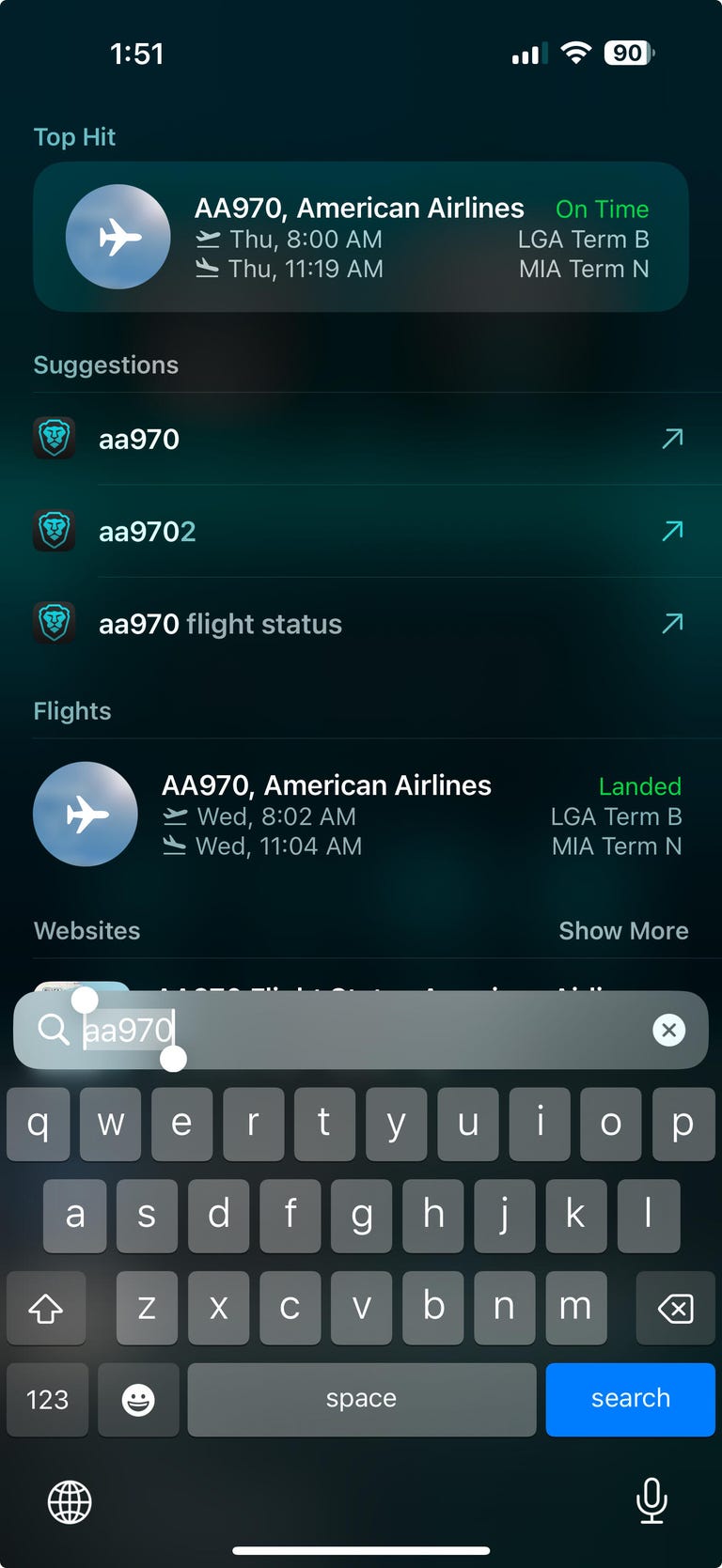
You can drop your flight number into your iPhone's Spotlight Search to quickly get the latest details and status of your upcoming flight. Screenshot by CNET
If getting your flight information from Messages wasn't easy enough, you can also grab the details right from your iPhone's home screen by swiping down and adding your flight number into Spotlight Search. This works with Spotlight Search on your Mac computer, too.
How to access the hidden flight tracker
Although the airline name/flight number format highlighted above is the best way to go, there are other texting options that will lead you to the same result. So let's say we stick with American Airlines 9707, other options that may bring up the flight tracker include:
- AmericanAirlines9707 (no spaces)
- AmericanAirlines 9707 (only one space)
- AA9707 (airline name is abbreviated and no space)
- AA 9707 (abbreviated and space)
I would suggest you keep the airline name spelled out completely and add a space between the two pieces of information -- like in the previous section -- because for some airlines, these alternative options may not work.
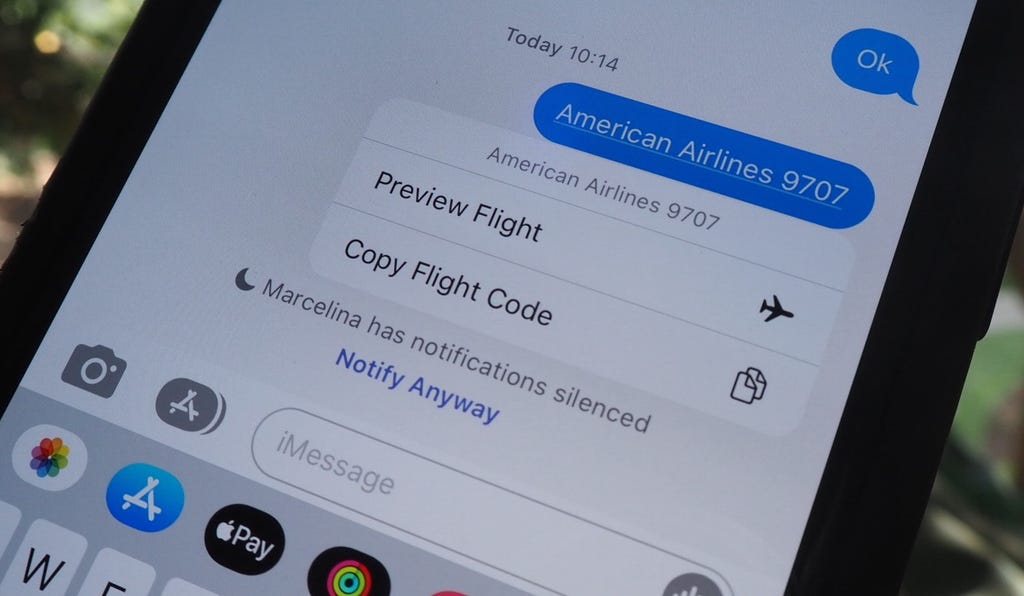
Text the code to preview your flight. Nelson Aguilar/CNET
Real-time flight tracking
Screenshot by CNET
Once everything is set, tap on the flight information in your text messages. If the feature works correctly, you should see the following two options appear in a quick-action menu:
- Preview Flight: View the flight's details. Tap this to view more information about the flight.
- Copy Flight Code: Copy the flight code to your clipboard (in case you want to send your flight details to someone else via text or email).
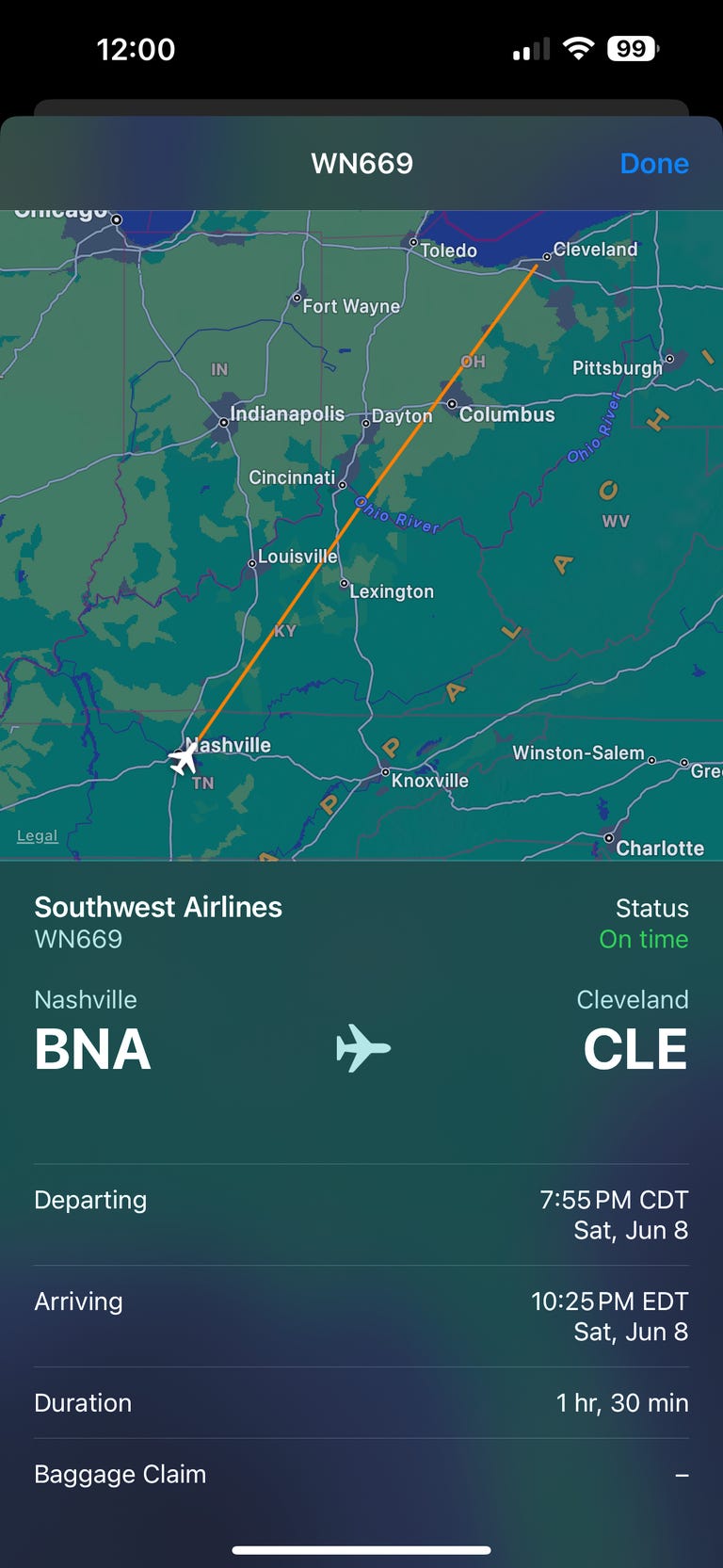
If you select Preview Flight, at the top of the window, you'll see the best part of this feature: a real-time flight tracker map. A line will connect the two destinations, and a tiny airplane will move between them, indicating where the flight is at that exact moment.
Underneath the map, you'll see important flight information:
- Airline name and flight number
- Flight status (arriving on time, delayed, canceled, etc.)
- Terminal and gate numbers (for arrival and departure)
- Arrival and departure time
- Flight duration
- Baggage claim (the number of the baggage carousel)
If you swipe left on the bottom half of the flight tracker, you can switch between flights, but only if there's a return flight.
For more travel tips, don't miss our feature on whether AI can help you fly more sustainably.


